

How smarter routing helps field sales teams close more deals, waste less time, and drive real revenue growth.
If your field sales reps are spending more time behind the wheel than in front of customers, you have a routing problem. A well-designed sales route planner doesn’t just tell your team how to get from Point A to Point B — it determines which customers to see, in what order, and when, based on data that actually moves the needle.
This guide covers everything you need to know about sales route planning: what it is, why it matters, how to build an effective process, and what to look for in a dedicated tool.
| What You’ll Learn • What a sales route planner is and how it works • The tangible benefits of optimized field sales routing • A step-by-step process for building your own sales routes • Key features to look for in route planning software • Common mistakes to avoid • FAQs about sales route planning |
What is a Sales Route Planner?
A sales route planner is a tool or system that helps field sales representatives map out the most efficient sequence of customer or prospect visits. At its core, it solves a classic logistics problem: given a set of locations to visit within a limited window of time, what is the optimal path to take?
But modern sales route planners go far beyond basic mapping. The best solutions integrate with your CRM and customer data to factor in variables like:
- Account value and deal size
- Likelihood to close or renewal probability
- Time since last visit
- Appointment windows and rep availability
- Real-time traffic and road conditions
- Territory boundaries and rep specialization
This means your reps aren’t just taking the fastest route — they’re taking the most valuable route, prioritizing the right customers at the right time.
Why Sales Route Planning Matters
Field sales is an expensive operation. Between salaries, travel costs, and the opportunity cost of time, every hour a rep spends in transit rather than in a meeting is money left on the table. Research consistently shows that field reps spend a surprisingly small fraction of their working day on actual selling activities — a significant share of the workday goes to travel, admin, and scheduling instead.
An effective sales route planner directly addresses this by:
Reducing Windshield Time
Optimized routes cut unnecessary backtracking and dead miles. Reps cover the same geographic area while visiting more stops — and arriving less frazzled.
Increasing the Number of Daily Visits
Even modest routing improvements can add one or two extra customer visits per day. Across a team of ten reps, that compounds into hundreds of additional touchpoints every month — a meaningful edge in any competitive territory.
Prioritizing High-Value Opportunities
Not all customer visits are equal. A smart sales route planner ensures that limited field time goes to accounts with the highest return: deals near closing, high-value renewals, or strategic prospects who have recently engaged with your brand.
Reducing Burnout and Improving Rep Retention
Constantly navigating chaotic, inefficient schedules is demoralizing. When reps know their day is well-organized and that management has given them the right tools, satisfaction improves — and so does retention.
Giving Managers Real Visibility
Route planning software typically provides dashboards that show managers where reps are, what they’ve accomplished, and how territory performance tracks against targets. This transparency enables smarter coaching and faster course corrections.
How to Build an Optimized Sales Route: A Step-by-Step Process
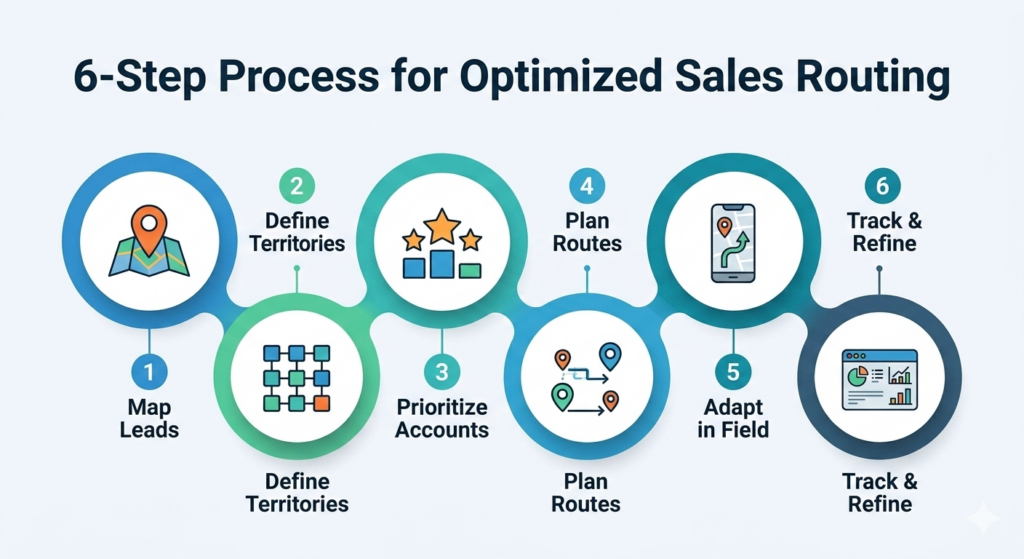
Whether you’re starting from scratch or overhauling an existing process, here’s a practical framework for getting your sales routing right.
Step 1: Define Your Territory Structure
Before you can plan routes, you need clearly defined territories. Territories should be balanced in terms of workload and opportunity — not just drawn arbitrarily by zip code or county lines. Consider factors like account density, potential revenue, and rep capacity when designing territories. Overlapping or undersized territories create route planning headaches that no software can fully fix.
Step 2: Map and Segment Your Customer Base
Pull your full customer and prospect list into a mapping tool and visualize where everyone is located. Look for natural clusters of accounts — these form the building blocks of daily or weekly routes. Segment accounts by tier, industry, or stage in the buying cycle so that priority visits can be easily identified during route planning.
Step 3: Identify Your Highest-Priority Visits
Not every account on your map deserves a visit this week. Use your CRM data to identify which accounts need attention most urgently. Prioritize based on deal stage, account health scores, days since last contact, or upcoming contract renewal dates. Your route planner should incorporate this logic automatically, surfacing the accounts that matter most.
Step 4: Build Daily Route Sequences
With priorities established, the route planner sequences your stops into geographically logical groupings. A good tool will cluster nearby visits and calculate travel time between them, accounting for realistic meeting durations. The goal is a route that keeps your rep in one general area rather than crisscrossing a city.
Step 5: Build in Flexibility for Changes
Even the best-planned day goes sideways. Meetings get cancelled, a hot lead calls in, or traffic on the interstate turns a 20-minute drive into an hour. Your routing process — and any software you use — should make it easy to re-optimize on the fly, suggesting nearby alternatives when a gap opens in the schedule.
Step 6: Track Results and Refine
After each visit, reps should log outcomes in the CRM directly from the field. Over time, this creates a feedback loop: which types of routes produce the best conversion rates? Which territories are consistently over- or under-performing? That data feeds back into smarter routing next week, next month, and next quarter.
| Pro Tip The most effective sales route planners don’t just optimize for distance — they optimize for revenue. Make sure your process weights visit priority based on deal value, not just geography. |
Key Features to Look for in Sales Route Planning Software
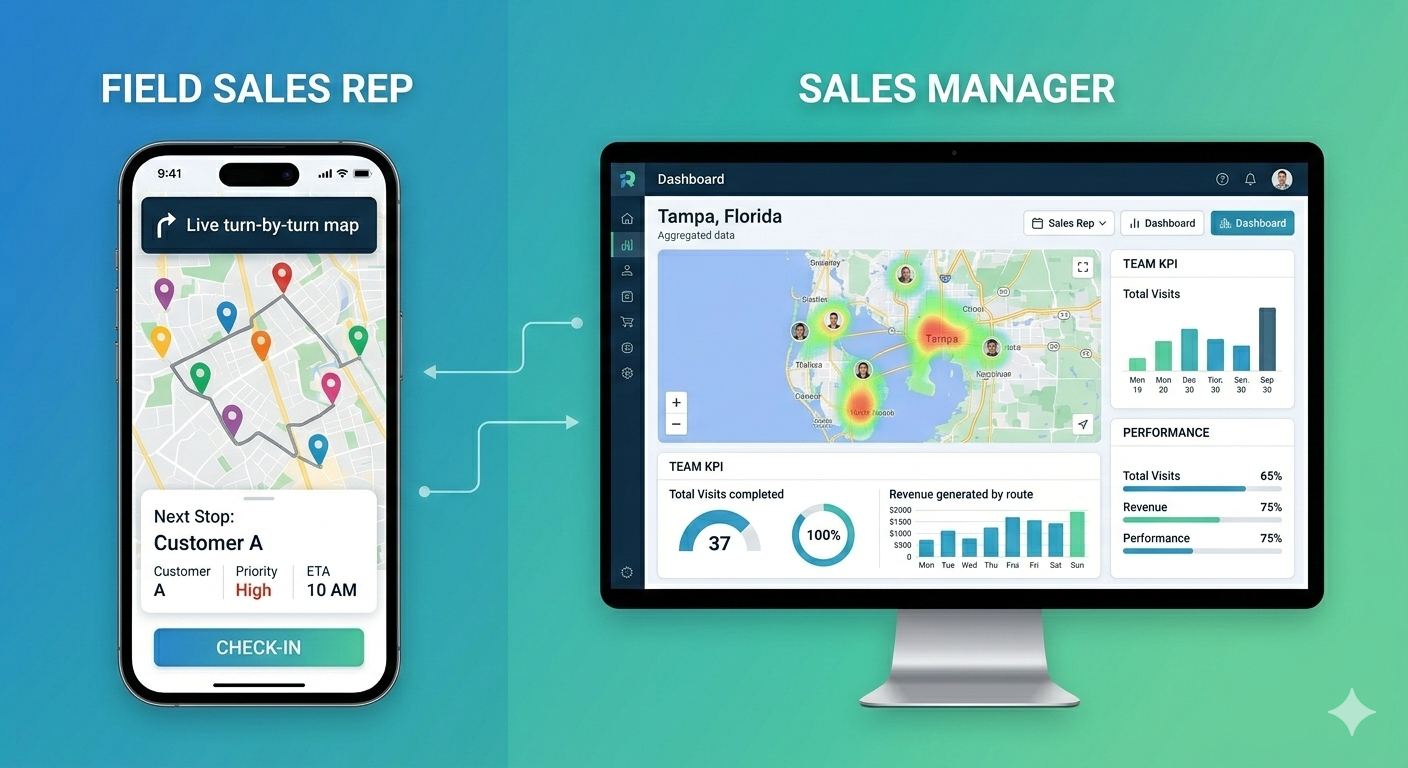
Manual route planning with spreadsheets and Google Maps can get you started, but it doesn’t scale. Dedicated sales route planning software unlocks a layer of intelligence that manual tools simply can’t replicate. Here’s what to look for:
CRM Integration
Your route planner should connect directly to your CRM so that customer data, deal stages, and visit history automatically inform routing decisions. Without this integration, reps are making prioritization calls without the full picture — and data entry after visits becomes a chore that gets skipped.
Multi-Stop Optimization
Your reps aren’t visiting two locations a day — they might have eight to twelve stops. The software needs to solve the multi-stop optimization problem efficiently, producing routes that minimize total travel time while hitting all required appointments.
Real-Time Traffic and Re-Routing
Live traffic updates allow the software to reroute around accidents or congestion, keeping reps on schedule. Look for tools that actively monitor conditions throughout the day and proactively suggest adjustments, rather than just providing a static route at the start of the morning.
Mobile Access for Reps in the Field
Route planning software is only useful if reps can access it while they’re out. A strong mobile experience — with offline capability in case of poor signal — is essential for teams covering large or rural territories.
Automated Mileage and Activity Logging
Manual mileage tracking and post-visit note entry are time-sinks that pull reps away from selling. Look for tools that automatically log mileage for expense reporting and allow voice-to-text or quick-entry visit notes directly from the mobile app.
Manager Dashboards and Reporting
Sales leaders need visibility into field activity without micromanaging. A good sales route planner provides dashboards showing rep location, visits completed, pipeline progression from field calls, and territory performance against targets.
Compatibility with Your Existing Tech Stack
Evaluate how the route planning tool fits into your existing sales technology ecosystem. The best outcomes come when route planning is embedded in a broader workflow — connected to calendars, CRM, communication tools, and reporting platforms — rather than operating as a standalone island.
Common Sales Route Planning Mistakes to Avoid
Even teams with the right technology can undermine their route planning with avoidable errors. Watch out for these common pitfalls:
- Over-scheduling the day. Leaving zero buffer time sets reps up for a cascading series of late arrivals. Build in realistic transition time — including parking, check-ins, and meeting overruns.
- Ignoring territory balance. If one rep’s territory has twice the accounts of another’s, optimizing routes within each territory still leaves the underlying imbalance unaddressed. Route planning should be paired with regular territory reviews.
- Not using mobile tools in the field. A route plan built in the office that can’t be accessed or adjusted from a smartphone is of limited use once the rep is on the road.
- Failing to capture visit data. The long-term value of a sales route planner depends on accumulating data about what works. Reps who skip post-visit logging are eroding the system’s ability to improve over time.
- Treating routing as a set-and-forget exercise. Markets change, accounts move, and new prospects emerge. Route plans should be reviewed and refreshed regularly — not built once and left untouched for months.
Sales Route Planner FAQs
Absolutely. Even a single rep with a modest territory benefits from optimized routing — fewer miles driven, more visits completed, and clearer records of field activity. Many sales route planning tools offer pricing tiers suited to small teams.
Most dedicated route planning platforms offer native integrations or API connections to major CRMs. Once connected, the route planner can pull in account locations, deal data, and visit history to inform routing recommendations, and push visit logs back into the CRM after calls.
At minimum, routes should be reviewed weekly to reflect changes in deal status, new prospects, and completed visits. In fast-moving territories, daily re-optimization is common — especially when leveraging real-time tools that dynamically adjust for schedule changes.
For any organization with a field sales team, the ROI calculation is typically straightforward. If optimized routing adds even one additional customer visit per rep per day, and if a portion of those visits generate incremental revenue, the tool pays for itself quickly. The harder cost to quantify — but equally real — is the improvement in rep morale and retention that comes from having a well-organized, manageable schedule.
Getting Started with Sales Route Planning
The right sales route planner transforms how your field team operates. Reps spend less time driving and more time selling. Managers get real visibility into territory performance. And the business gets more value from every dollar spent on field sales.
Whether you’re evaluating dedicated software or looking to build a more disciplined process with existing tools, the fundamentals remain the same: map your customers, prioritize by value, sequence your stops efficiently, stay flexible, and capture data to keep improving.
Start with the principles, choose technology that fits your team’s size and complexity, and iterate from there. The compounding effect of even small routing improvements adds up to significant revenue gains over time.
For a deeper look at how this plays out across a field team, see our guide to field sales productivity.